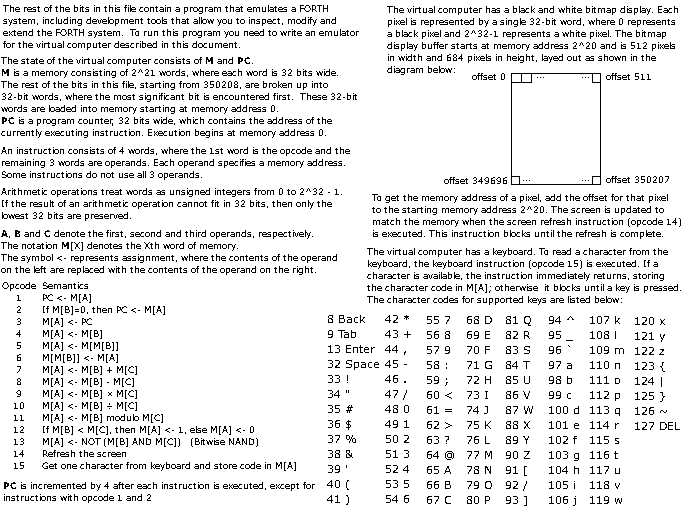
I learned about Cuneiforth recently as it was brought to Lobsters and Malleable Systems Forum. Cuneiforth is a Forth implementation for a simple Virtual Machine, similar to the Chifir VM used to run Smalltalk system in “The Cuneiform Tablets of 2015” paper but with a different character encoding. The paper is available for free, similarly to all ACM articles since the beginning of 2026.
The difference between Smalltalk and Forth VMs is not a problem
as building universal VM is specifically not a goal.
As mentioned in the “The Cuneiform Tablets of 2015” paper:
As we have mentioned before, Chifir is just an incarnation
of the idea of the simple virtual machine, tailored to emulate a
specific platform. Since the Xerox Alto does not have signed
integers, floating point numbers, or many other features,
Chifir does not instructions for signed integer or floating point
arithmetic. To emulate other platforms radically different
from the Xerox Alto, we would need a different kind of
simple virtual machine.
Cuneiforth is provided as a disk image with a header that is a 1-bit 684x512 image. Extracting this image was easy by converting to PBM format and then using ImageMagick to convert the image to PNG. The only non-obvious part is that the disk image is provided as a file with bytes, so you need to know the order of bits in a byte. In this case the most significant bit comes before the least significant bit in a byte, but it can be figured out by trying. I attach extracted image below.
The interesting part of the challenge is implementing the virtual machine based on this description and running the Forth system there.
Zig supports embedding the files during compilation
with @embedFile
similarly to include_bytes! macro in Rust.
Zig, however, has an interesting ability to intialize arrays during compilation which I used to skip the instruction image part and convert big-endian 32-bit words to native (little-endian on x86_64) words during compilation:
const std = @import("std");
const assert = std.debug.assert;

var memory: [1 << 21]u32 = undefined;

/// Initial memory contents is stored separately
/// and copied into VM memory in runtime
/// to avoid bloating the binary with 8 MiB of mostly zeroes.
const initial_memory = init: {
    const diskFile = @embedFile("disk.img");
    assert(diskFile.len == 216772);

    // The first 350208 (684 * 512) bits are the instruction image.
    const disk = diskFile[684 * 512 / 8 ..];
    assert(disk[7] == 2);
    assert(disk[10] == 0xa8);
    assert(disk[11] == 0xbe);

    @setEvalBranchQuota(500000);
    var mem = [_]u32{0} ** 43249;
    assert(disk.len == 43249 * 4);

    for (0..disk.len / 4) |word_index| {
        mem[word_index] = std.mem.readInt(u32, disk[word_index * 4 ..][0..4], .big);
    }

    assert(mem[0] == 1);
    assert(mem[1] == 2);
    assert(mem[2] == 0xa8be);
    assert(mem[3] == 0);
    assert(mem[4] == 0);

    break :init mem;
};

pub fn main(init: std.process.Init) !void {
    @memcpy(memory[0..initial_memory.len], &initial_memory);

    ...
}
Note that initial_memory is copied into uninitialized memory in runtime at the program start.
I tried to initialize memory during compilation time,
but then the whole 8 MiB of memory, which mostly consists of zeroes, goes into the .text
section and all zeroes are stored in the resulting ELF file as is.
Not initializing memory during compilation moves it into the .bss section
so it does not take space in the resulting binary.
Most operations are straighforward to implement, except for 14 (output) and 15 (input) opcodes.
I started by using SDL
and it is easy to use SDL from Zig as it has good C interoperability.
There have been recent changes in Zig 0.16.0,
but even the deprecated @cImport way still works.
Using SDL for output worked, but then I dropped it in favor of something more interesting: Sixel graphics.
I used foot terminal emulator as it supports Sixel protocol.
/// Prints the VM screen contents in Sixel format.
fn refresh(writer: *std.Io.Writer) std.Io.Writer.Error!void {
    const screenPtr: *[684][512]u32 = @ptrCast(memory[1 << 20 ..]);

    // Clear the screen.
    try writer.writeAll("\x1b[2J");

    // Reset the cursor position.
    try writer.writeAll("\x1b[H");

    // Enable sixel mode.
    try writer.writeAll("\x1bPq");

    // Raster attributes.
    try writer.writeAll("\"1;1;512;684");

    // White color.
    try writer.writeAll("#15");

    var row: usize = 0;
    while (row < screenPtr.len) : (row += 6) {
        // Graphics New Line.
        if (row > 0) try writer.writeByte('-');

        var col: usize = 0;
        while (col < screenPtr[row].len) : (col += 1) {
            var sixel_char: u8 = 0;
            for (0..6) |bit_index| {
                if (screenPtr[row + bit_index][col] != 0) {
                    sixel_char |= @as(u8, 1) << @intCast(bit_index);
                }
            }
            try writer.writeByte(0x3f + sixel_char);
        }
    }
    try writer.writeAll("\x1b\\");
    try writer.flush();
}
Input worked fine in the default line buffered terminal mode,
but to be able to type character by character and use backspace,
terminal needs to be switched to raw mode.
This can be done from the shell similarly to how
Dusk OS readme suggests
with (stty -icanon -echo min 0; ./dusk; stty icanon echo),
but I built this in with this code in main:
    const old_term = try std.posix.tcgetattr(std.posix.STDIN_FILENO);
    var new_term = old_term;
    new_term.lflag.ICANON = false;
    new_term.lflag.ECHO = false;
    try std.posix.tcsetattr(std.posix.STDIN_FILENO, .NOW, new_term);
    defer std.posix.tcsetattr(std.posix.STDIN_FILENO, .NOW, old_term) catch unreachable;
With everything set up, coding a working VM loop is straightforward:
fn run(writer: *std.Io.Writer, reader: *std.Io.Reader) !void {
    var pc: u32 = 0;
    while (true) {
        const opcode = memory[pc];
        const a = memory[pc + 1];
        const b = memory[pc + 2];
        const c = memory[pc + 3];
        var new_pc = pc + 4;
        switch (opcode) {
            1 => new_pc = memory[a],
            2 => if (memory[b] == 0) {
                new_pc = memory[a];
            },
            3 => memory[a] = pc,
            4 => memory[a] = memory[b],
            5 => memory[a] = memory[memory[b]],
            6 => memory[memory[b]] = memory[a],
            7 => memory[a] = memory[b] +% memory[c],
            8 => memory[a] = memory[b] -% memory[c],
            9 => memory[a] = memory[b] *% memory[c],
            10 => memory[a] = memory[b] / memory[c],
            11 => memory[a] = memory[b] % memory[c],
            12 => memory[a] = if (memory[b] < memory[c]) 1 else 0,
            13 => memory[a] = ~(memory[b] & memory[c]),
            14 => try refresh(writer),
            15 => {
                memory[a] = try reader.takeByte();
                if (memory[a] == 10) {
                    memory[a] = 13;
                }
                // Make backspace work.
                if (memory[a] == 127) {
                    memory[a] = 8;
                }
            },
            else => {
                std.debug.print("Unknown opcode: {d}\n", .{opcode});
                break;
            },
        }
        pc = new_pc;
    }
}
Handling input required some remapping to make enter and backspace work.
Largest problem I noticed is that that VM is underspecified. It's not clear what happens on integer overflows, especially for multiplication. “The Cuneiform Tablets of 2015” paper suggested that system implementation could include tests that run after booting the system and test that VM behaves as expected. Fully specifiying VM behavior and testing it could solve this problem, as currently the behavior on overflow in the Forth system depends on how the VM is implemented.
Another minor problem in the description is that
it says that
PC is incremented by 4 after each instruction is executed,
except for instructions with opcode 1 and 2
,
while in fact the instruction 2 only does not increase the program counter
when the condition is false, as otherwise it would have ended up in infinite loop.
The only remaining part is constructing the arguments for run() function
and calling it:
pub fn main(init: std.process.Init) !void {
    @memcpy(memory[0..initial_memory.len], &initial_memory);

    const old_term = try std.posix.tcgetattr(std.posix.STDIN_FILENO);
    var new_term = old_term;
    new_term.lflag.ICANON = false;
    new_term.lflag.ECHO = false;
    try std.posix.tcsetattr(std.posix.STDIN_FILENO, .NOW, new_term);
    defer std.posix.tcsetattr(std.posix.STDIN_FILENO, .NOW, old_term) catch unreachable;

    var stdout_buffer: [128]u8 = undefined;
    var stdout_file_writer = std.Io.File.stdout().writer(init.io, &stdout_buffer);
    const stdout_writer = &stdout_file_writer.interface;

    var stdin_buffer: [128]u8 = undefined;
    var stdin_file_reader = std.Io.File.stdin().reader(init.io, &stdin_buffer);
    const stdin_reader = &stdin_file_reader.interface;

    try run(stdout_writer, stdin_reader);
}
I have used the build system and there is an advantage
of having the build cached in .zig-cache,
but finally the code runs by just placing main.zig
next to disk.img and running
foot zig run main.zig.
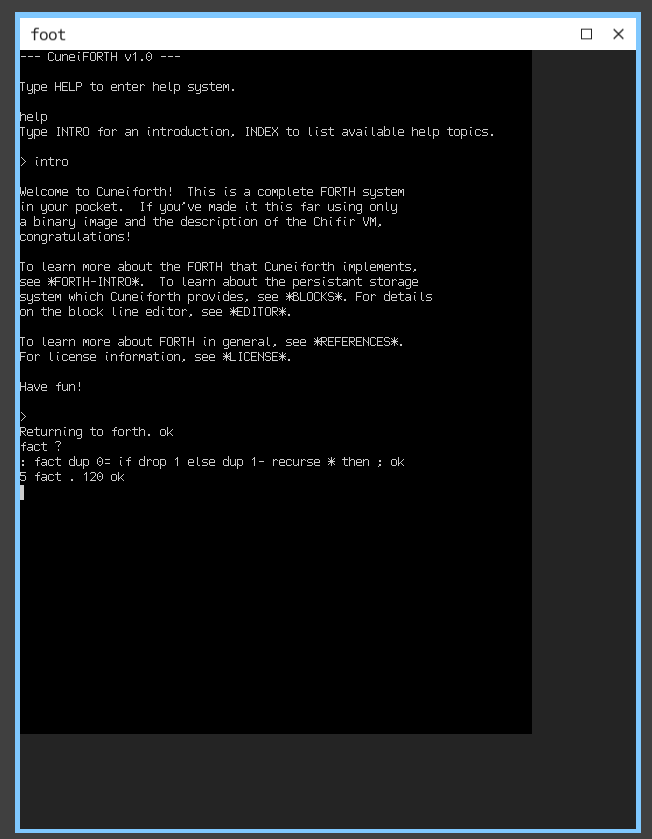
I have not fully explored the system itself and at the time of the writing it still developed with the latest commit from 2026-06-27. BLOCKS-2 help page says emulators might want to store the memory area following the screen memory as it is used by the blocks editor, so further improvements to the emulator are possible.