OPKSSH is a program that makes it possible to log into SSH servers with any OIDC provider. For example, it can be used to grant someone with an existing Codeberg or GitHub account access to the server without relying on a long term SSH key. Many CI providers now give OIDC tokens to CI jobs to make it possible to authenticate uploads to package registries without long term secrets. I wanted to use such OIDC token authentication in existing CI jobs that already use rsync over SSH, so I tried OPKSSH and took notes.
Cloned https://aur.archlinux.org/opkssh.git at commit b8c15dccb0aeda296127b6137ba930f9b730319b, version 0.14.0.
Tried to build with pkgctl build --install-to-host all.
==> Starting check()...
panic: runtime error: invalid memory address or nil pointer dereference
[signal SIGSEGV: segmentation violation code=0x1 addr=0x0 pc=0x55b6c06b2fb6]

goroutine 1 [running]:
internal/sync.(*Mutex).Lock(...)
	internal/sync/mutex.go:63
sync.(*Mutex).Lock(...)
	sync/mutex.go:46
github.com/awnumar/memguard/core.Purge.func1(0x339140865c88)
	github.com/awnumar/memguard@v0.22.3/core/exit.go:23 +0x36
github.com/awnumar/memguard/core.Purge()
	github.com/awnumar/memguard@v0.22.3/core/exit.go:51 +0x1e
github.com/awnumar/memguard/core.Panic(...)
	github.com/awnumar/memguard@v0.22.3/core/exit.go:85
github.com/awnumar/memguard/core.NewBuffer(0x20)
	github.com/awnumar/memguard@v0.22.3/core/buffer.go:73 +0x505
github.com/awnumar/memguard/core.NewCoffer()
	github.com/awnumar/memguard@v0.22.3/core/coffer.go:30 +0x2d
github.com/awnumar/memguard/core.init.0()
	github.com/awnumar/memguard@v0.22.3/core/enclave.go:15 +0x29
FAIL	github.com/openpubkey/opkssh	0.008s
panic: runtime error: invalid memory address or nil pointer dereference
[signal SIGSEGV: segmentation violation code=0x1 addr=0x0 pc=0x563ed1c887b6]

goroutine 1 [running]:
internal/sync.(*Mutex).Lock(...)
	internal/sync/mutex.go:63
sync.(*Mutex).Lock(...)
	sync/mutex.go:46
github.com/awnumar/memguard/core.Purge.func1(0x2c616e157c88)
	github.com/awnumar/memguard@v0.22.3/core/exit.go:23 +0x36
github.com/awnumar/memguard/core.Purge()
	github.com/awnumar/memguard@v0.22.3/core/exit.go:51 +0x1e
github.com/awnumar/memguard/core.Panic(...)
	github.com/awnumar/memguard@v0.22.3/core/exit.go:85
github.com/awnumar/memguard/core.NewBuffer(0x20)
	github.com/awnumar/memguard@v0.22.3/core/buffer.go:73 +0x505
github.com/awnumar/memguard/core.NewCoffer()
	github.com/awnumar/memguard@v0.22.3/core/coffer.go:30 +0x2d
github.com/awnumar/memguard/core.init.0()
	github.com/awnumar/memguard@v0.22.3/core/enclave.go:15 +0x29
FAIL	github.com/openpubkey/opkssh/commands	0.007s
panic: runtime error: invalid memory address or nil pointer dereference
[signal SIGSEGV: segmentation violation code=0x1 addr=0x0 pc=0x55a50384c696]

goroutine 1 [running]:
internal/sync.(*Mutex).Lock(...)
	internal/sync/mutex.go:63
sync.(*Mutex).Lock(...)
	sync/mutex.go:46
github.com/awnumar/memguard/core.Purge.func1(0x177c53961c88)
	github.com/awnumar/memguard@v0.22.3/core/exit.go:23 +0x36
github.com/awnumar/memguard/core.Purge()
	github.com/awnumar/memguard@v0.22.3/core/exit.go:51 +0x1e
github.com/awnumar/memguard/core.Panic(...)
	github.com/awnumar/memguard@v0.22.3/core/exit.go:85
github.com/awnumar/memguard/core.NewBuffer(0x20)
	github.com/awnumar/memguard@v0.22.3/core/buffer.go:73 +0x505
github.com/awnumar/memguard/core.NewCoffer()
	github.com/awnumar/memguard@v0.22.3/core/coffer.go:30 +0x2d
github.com/awnumar/memguard/core.init.0()
	github.com/awnumar/memguard@v0.22.3/core/enclave.go:15 +0x29
FAIL	github.com/openpubkey/opkssh/commands/config	0.007s
?   	github.com/openpubkey/opkssh/internal/projectpath	[no test files]
?   	github.com/openpubkey/opkssh/internal/sysdetails	[no test files]
panic: runtime error: invalid memory address or nil pointer dereference
[signal SIGSEGV: segmentation violation code=0x1 addr=0x0 pc=0x563307bc6536]

goroutine 1 [running]:
internal/sync.(*Mutex).Lock(...)
	internal/sync/mutex.go:63
sync.(*Mutex).Lock(...)
	sync/mutex.go:46
github.com/awnumar/memguard/core.Purge.func1(0x2e6ed4475c88)
	github.com/awnumar/memguard@v0.22.3/core/exit.go:23 +0x36
github.com/awnumar/memguard/core.Purge()
	github.com/awnumar/memguard@v0.22.3/core/exit.go:51 +0x1e
github.com/awnumar/memguard/core.Panic(...)
	github.com/awnumar/memguard@v0.22.3/core/exit.go:85
github.com/awnumar/memguard/core.NewBuffer(0x20)
	github.com/awnumar/memguard@v0.22.3/core/buffer.go:73 +0x505
github.com/awnumar/memguard/core.NewCoffer()
	github.com/awnumar/memguard@v0.22.3/core/coffer.go:30 +0x2d
github.com/awnumar/memguard/core.init.0()
	github.com/awnumar/memguard@v0.22.3/core/enclave.go:15 +0x29
FAIL	github.com/openpubkey/opkssh/policy	0.008s
ok  	github.com/openpubkey/opkssh/policy/files	0.005s
panic: runtime error: invalid memory address or nil pointer dereference
[signal SIGSEGV: segmentation violation code=0x1 addr=0x0 pc=0x564e1a415116]

goroutine 1 [running]:
internal/sync.(*Mutex).Lock(...)
	internal/sync/mutex.go:63
sync.(*Mutex).Lock(...)
	sync/mutex.go:46
github.com/awnumar/memguard/core.Purge.func1(0x24dc80275c88)
	github.com/awnumar/memguard@v0.22.3/core/exit.go:23 +0x36
github.com/awnumar/memguard/core.Purge()
	github.com/awnumar/memguard@v0.22.3/core/exit.go:51 +0x1e
github.com/awnumar/memguard/core.Panic(...)
	github.com/awnumar/memguard@v0.22.3/core/exit.go:85
github.com/awnumar/memguard/core.NewBuffer(0x20)
	github.com/awnumar/memguard@v0.22.3/core/buffer.go:73 +0x505
github.com/awnumar/memguard/core.NewCoffer()
	github.com/awnumar/memguard@v0.22.3/core/coffer.go:30 +0x2d
github.com/awnumar/memguard/core.init.0()
	github.com/awnumar/memguard@v0.22.3/core/enclave.go:15 +0x29
FAIL	github.com/openpubkey/opkssh/policy/plugins	0.007s
panic: runtime error: invalid memory address or nil pointer dereference
[signal SIGSEGV: segmentation violation code=0x1 addr=0x0 pc=0x5598f5452216]

goroutine 1 [running]:
internal/sync.(*Mutex).Lock(...)
	internal/sync/mutex.go:63
sync.(*Mutex).Lock(...)
	sync/mutex.go:46
github.com/awnumar/memguard/core.Purge.func1(0x209691ad3c88)
	github.com/awnumar/memguard@v0.22.3/core/exit.go:23 +0x36
github.com/awnumar/memguard/core.Purge()
	github.com/awnumar/memguard@v0.22.3/core/exit.go:51 +0x1e
github.com/awnumar/memguard/core.Panic(...)
	github.com/awnumar/memguard@v0.22.3/core/exit.go:85
github.com/awnumar/memguard/core.NewBuffer(0x20)
	github.com/awnumar/memguard@v0.22.3/core/buffer.go:73 +0x505
github.com/awnumar/memguard/core.NewCoffer()
	github.com/awnumar/memguard@v0.22.3/core/coffer.go:30 +0x2d
github.com/awnumar/memguard/core.init.0()
	github.com/awnumar/memguard@v0.22.3/core/enclave.go:15 +0x29
FAIL	github.com/openpubkey/opkssh/sshcert	0.007s
?   	github.com/openpubkey/opkssh/test/testutil	[no test files]
FAIL
==> ERROR: A failure occurred in check().
    Aborting...
==> ERROR: Build failed, check /var/lib/archbuild/extra-x86_64/user-1/build
Apparently pkgctl build uses arch-nspawn
which in turn uses systemd-nspawn
It looks like there is a similar issue reported about systemd-nspawn resulting in memguard segfaulting.
I worked around the problem by commenting out the check() phase in the PKGBUILD and commented in the issue.
I first tried to run opkssh login.
This opened Firefox with options to
“Sign in with Microsoft”,
“Sign in with GitLab”,
“Sign in with Google” and
“Sign in with Hellō”.
I wanted to just try it with an account that I already have.
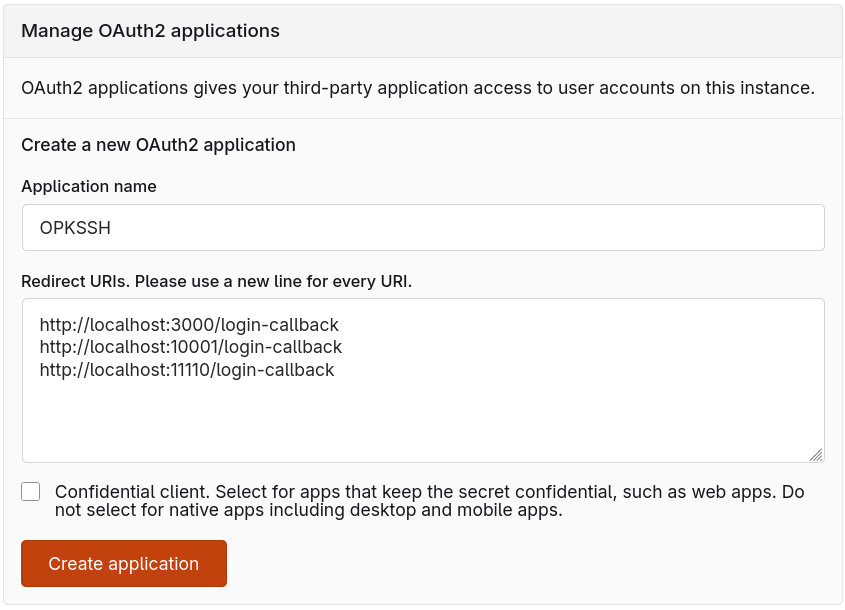
So I went to Codeberg User settings > Applications and created
an application “OPKSSH” there.
After some trial and error I figured out that "Redirect URIs" should contain at least http://localhost:10001/login-callback
because browser URL had &redirect_uri=http%3A%2F%2Flocalhost%3A10001%2Flogin-callback&
when Codeberg showed me “Unregistered Redirect URI” page.
“Confidential client” checkmark was enabled by default, but I have turned it off
because README said “Do not use Confidential/Secret mode”.
Default configuration for existing providers uses ports 3000, 10001 and 11110, so just put this into "Redirect URIs" field:
http://localhost:3000/login-callback
http://localhost:10001/login-callback
http://localhost:11110/login-callback
Once you have an application registered, you can run
opkssh login --provider=https://codeberg.org,<Client ID>,<Client secret>,openid.
Don't know how to properly put there both openid and email scopes,
probably need to quote the argument and separate them with a space.
Anyway, to avoid passing --provider argument each time with client ID and secret,
I have ran opkssh login --create-config
and then used it as an example to put Codeberg as a provider there.
I ended up with the following config:
$ cat ~/.opk/config.yml
---
default_provider: webchooser

providers:
  - alias: codeberg
    issuer: https://codeberg.org
    client_id: 1cbb5e21-5e52-4f89-a3f8-156287ea99ee # Replace with your Client ID
    client_secret: <Client secret> # Replace with your Client secret
    scopes: openid email
    access_type: offline
    prompt: consent
    redirect_uris:
      - http://localhost:3000/login-callback
      - http://localhost:10001/login-callback
      - http://localhost:11110/login-callback
Now running opkssh login creates ~/.ssh/id_ecdsa-cert.pub and ~/.ssh/id_ecdsa valid for 24 hours.
To test that I can login anywhere with this key, I need to setup OPKSSH on the server.
Now I wanted to try OPKSSH on the server. Installed Debian 13 (Trixie).
Turns out OPKSSH is packaged in Debian, but it is version 0.4.0.
I tried it, it did not work with my opkssh 0.14.0 client, so in the end I downloaded
official release into /usr/local/bin/opkssh.
Except for the docs, the package only contains /usr/bin/opkssh and does not create user,
so there are no advantages of using it over /usr/local/bin/opkssh, it does not make setup easier.
I then followed the README. OPKSSH provides an installation script, but I wanted to understand what the script changes, so I have set the server up manually by following installtion instructions.
First, create the group and the user:
# groupadd --system opksshuser
# useradd -r -M -s /sbin/nologin -g opksshuser opksshuser
On the server, create the following /etc/opk/providers, substituting the Client ID with the ID from your application:
https://codeberg.org 1cbb5e21-5e52-4f89-a3f8-156287ea99ee 24h
Make sure that issuer https://codeberg.org is exactly the same, do not put / in the end.
This is how it appears in https://codeberg.org/.well-known/openid-configuration.
Set up permissions:
# chown root:opksshuser /etc/opk/providers
# chmod 640 /etc/opk/providers
Create empty /etc/opk/auth_id, then allow your email to login as root (replace alice@example.org with your email address on Codeberg):
# chown root:opksshuser /etc/opk/auth_id
# chmod 640 /etc/opk/auth_id
# opkssh add root alice@example.org https://codeberg.org
Create /etc/ssh/sshd_config.d/60-opk-ssh.conf and reload the config with systemctl reload ssh:
# cat /etc/ssh/sshd_config.d/60-opk-ssh.conf
AuthorizedKeysCommand /usr/local/bin/opkssh verify %u %k %t
AuthorizedKeysCommandUser opksshuser
Now you can login with
ssh -o "IdentitiesOnly=yes" -i ~/.ssh/id_ecdsa root@example.net
after running opkssh login locally
where example.net is your server hostname or IP.
If something does not work,
it is helpful to run opkssh audit,
at least it complains about permissions
and mismatch in the issuer URL (such as unnecessary /).
To avoid specifying identity file each time,
I have put this into my ~/.ssh/config:
Host *
	IdentitiesOnly yes

Host pages
	User root
	Hostname example.net
	IdentityFile ~/.ssh/id_ecdsa
With this setup I can log into the server with Codeberg.
I skipped the step configuring sudo for opkssh readhome, so ~/.opk/auth_id cannot be used,
and plan to configure everything through /etc/opk/auth_id.
Next, I want to setup users for uploading websites that will authenticate using OIDC.
I want them to use rrsync.
I cannot setup the command in ~/.ssh/authorized_keys, it should be output by opkssh to work,
but apparently opkssh cannot to this.
To force rrsync usage I will force it with ForceCommand directive in sshd_config.
OPKSSH has a GitHub Actions Guide.
Following the guide, I added https://token.actions.githubusercontent.com github oidc to /etc/opk/providers.
After pointing a domain name at the server,
I installed Caddy on Debian
with apt install caddy.
Caddy is configured via /etc/caddy/Caddyfile where I wrote:
example.org {
	root * /var/www/html/example.org
	file_server
}
I placed basic index.html into /var/www/html/index.html
and started the server with systemctl start caddy.
Now let's say we want to deploy example.org as a separate user.
I created the user with useradd -r -M deploy-example_org -s /bin/sh.
The user will need a shell to access rsync.
Ideally the command should be restricted to use rrsync,
but we cannot do this via ~/.ssh/authoritzed_keys
so this will have to be enforced in sshd we will have to enforce with /etc/ssh/sshd_config.d/ snippet.
The user will deploy with:
# chown deploy-example_org:deploy-example_org /var/www/html/example.org/
# chmod 755 /var/www/html/example.org/
Now deployment user can rsync files.
To allow deploying from the main branch it is suggested to use
opkssh add deploy-example_org repo:link2xt/opkssh-deploy-test:ref:refs/heads/main https://token.actions.githubusercontent.com
but instead I created an environment called staging
and used opkssh add deploy-example_org repo:link2xt/opkssh-deploy-test:environment:staging https://token.actions.githubusercontent.com
which just adds the line to /etc/opk/auth_id.
opkssh has no way to match on anything other than OIDC token's subject, so it is not possible to require both the environment and the branch,
but just restricting on the environment seems to be good enough.
The environment still contains no secrets, but in organization it is possible to restrict who can deploy using the environment,
e.g. to allow deploy to staging immediately, but only allow deploying to prod environment after approval.
I have successfully deployed web pages with the following workflow:
name: Deploy

on:
  push:
    branches:
      - main

permissions: {}

jobs:
  build:
    runs-on: ubuntu-latest
    permissions:
      contents: read
    steps:
    - name: Checkout
      uses: actions/checkout@v6
      with:
        persist-credentials: false

    - uses: actions/upload-artifact@v7
      with:
        name: pages
        path: www/

  deploy:
    needs: build
    runs-on: ubuntu-latest
    permissions:
      id-token: write
    environment:
      name: staging

    steps:
    - name: Install opkssh
      uses: openpubkey/setup-opkssh@30e1ee6d9d5cd51eceb2d0639d2fe4b6dc3ce272 # v1
      with:
        version: v0.14.0

    - name: Login
      run: opkssh login github

    - uses: actions/download-artifact@v8
      with:
        name: pages
        path:
          www/

    - name: rsync
      run: |
        rsync -avz --delete -e "ssh -o StrictHostKeyChecking=accept-new" "$GITHUB_WORKSPACE/www/" deploy-example_org@example.org:/var/www/html/example.org
Forgejo, which Codeberg uses, has support for similar tokens. Codeberg has a discussion about enabling trusted publishing, i.e. allowing to publish to package registries like PyPI, crates.io and npm by authenticating with OIDC. Forgejo https://forgejo.org/docs/latest/user/actions/security-openid-connect/ I tried to setup a workflow on Codeberg, but it did not work so I opened an issue.
Setup that I built worked, but I don't like that it requires changes to OpenSSH config.
Even without sudo configuration for opkssh readhome this increases attack surface.
Simply creating a separate SSH key for CI is not necessarily worse,
as it does not require any changes on the server other than adding a key to authorized_keys.
If the key is only stored in CI secrets and rotated at least sometimes, such setup may be more secure than using OPKSSH.