
Mastodon and GitHub have custom progress bars displayed at the top when the content is loading. These progress bar duplicate the spinners and show fake progress not related to any content being loaded. I blocked them with an ad blocker.
I opened @Mastodon@mastodon.social profile in Firefox 147.0.3. mastodon.social was running v4.6.0-nightly.2026-02-06 at the moment. To make nice screenshots I opened Responsive Design Mode with "Galaxy S20 Android 11" preset. There I also enabled Throttling with GPRS preset to simulate slow network. After scrolling the posts made by official Mastodon profile down a bit, I navigated to some post with an image:
The page started loading, but took a while to finish because of the image inside.
When the post navigated to contains an image, it seems Mastodon displays the spinner in place of the post and does not even display the text until the whole post with an image is finished loading.
The progress bar meanwhile quickly went to 99% and stayed there.
As the page stayed the same, I could select the element and see that it is a div
element with "loading-bar" class and width set to 98.8959%.
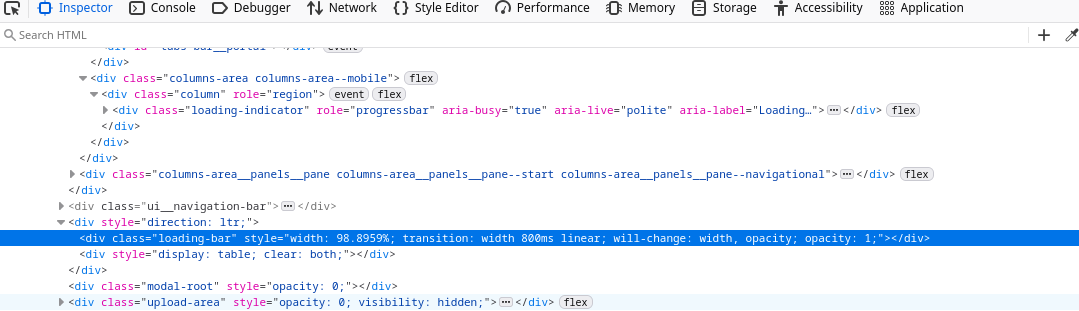
The progress bar is created by react-redux-loading-bar 5.0.8.
Project source code is available on GitHub, but it is archived.
Inside the source there is a function called simulateProgress called periodically using setInterval every 400 ms.
The code roughly translates to this Python code printing all the values that the progress bar goes through:
from math import cos, pi

PROGRESS_INCREASE = 20
MAX_PROGRESS = 99

p = 0.0
while True:
    next_p = p + PROGRESS_INCREASE * cos(p * (pi / 200))
    if next_p <= MAX_PROGRESS:
        p = next_p
        print(f"{p:.4f}")
    else:
        break
It prints all the values that the progress bar goes through:
20.0000
39.0211
55.3803
68.2782
77.8366
84.6596
89.4324
92.7371
95.0139
96.5787
97.6530
98.3902
98.8959
There are also some CSS animations added on top that I have not looked into.
I added these details to the related issue on Mastodon GitHub and removed this progress bar using uBlock Origin by adding this custom rule:
! Block fake `react-redux-loading-bar` progress bar.
! See <https://github.com/mastodon/mastodon/issues/27710> for details.
fosstodon.org##.loading-bar
GitHub has a similarly fake progress bar, but using a different implementation. Here is a screenshot of switching from the Code tab to Issues tab:

This progress bar works differently from Mastodon's. It goes slowly to the end at constant rate, and even when it finishes the page does not load. Inspecting it showed that the progress bar was not only over 100%, but still steadily updating to values over 100%:
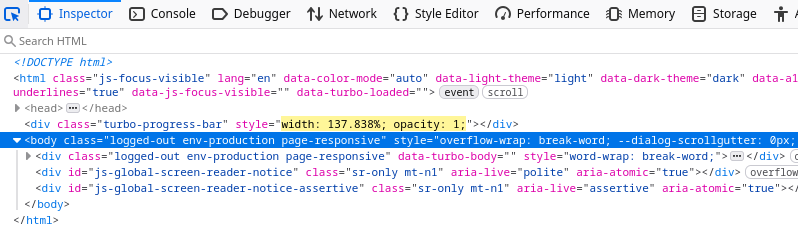
GitHub is not open source, but the div element class turbo-progress-bar
reveals that it uses Turbo Drive.
The source code of the progress bar is open.
There is a function called "trickle" that adds randomly 0.0..1.0% to the progress bar.
The value is supposed to be scaled to 10%..90% range in the function called refresh.
I don't know why it went over 100% in my test and have not investigated why refresh function was not called, but otherwise the behavior matches the source code.
I added the following line to by uBlock Origin filters to hide this fake progress bar:
github.com##.turbo-progress-bar
Now on GitHub I have no indication that anything is loading at all. On normal static websites when you navigate to another page, refresh button in Firefox 147.0.3 turns into a cross icon that cancels the request and favicon on the tab is replaced to indicate that the page is loading. On GitHub there is no indication that anything is loading, and the request may even fail in which case I remain on the old page. I don't have a fix for this, but it is still better than having fake progress bar that always shows progress even if nothing is loaded.
Add this to "My filters" tab of uBlock Origin:
! Block fake `react-redux-loading-bar` progress bar.
! See <https://github.com/mastodon/mastodon/issues/27710> for details.
fosstodon.org##.loading-bar
chaos.social##.loading-bar

github.com##.turbo-progress-bar

reddit.com##navigation-indicator
Yes, there is also reddit.com. I wanted to quickly find some example of better progress bar and checked what Reddit does, but discovered they also have fake progress bar built as a web component that goes to the end and stays there. So I blocked it as well and stopped searching.