I wanted to make encrypted backups to an SSH server that I have access to without installing additional software there, specifically a Synology NAS (Network Attached Storage). I first tried BorgBackup, but afterwards switched to restic because it is easier to setup without installing anything on the server.
I started by looking at BorgBackup because it is already used to backup servers to a Hetzner Storage Box. The problem I encountered is that Borg expects the server to already have the server part installed. Borg is a Python program with multiple dynamic dependencies, including OpenSSL and compression libraries. There is an unofficial package for Synology, but I did not want to install as I did not find the information about how it is built and who maintains it quickly. One of the suggested workarounds is mounting a filesystem over the network and running Borg completely locally, but I only found this suggestion later and do not want to mount the filesystem each time anyway.
After looking at several alternatives to BorgBackup, I tried restic 0.18.1. It works over SFTP (SSH File Transfer Protocol).
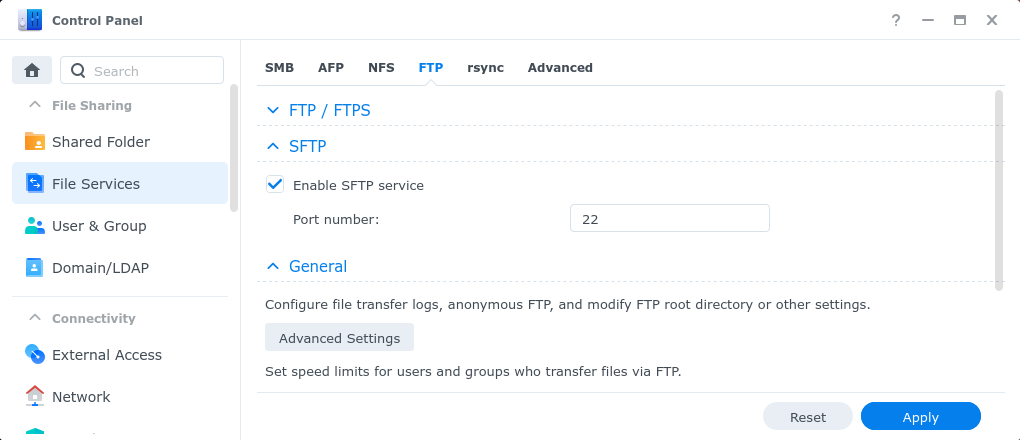
On DSM (DiskStation Manager) 7.1.1-42962 Update 9 SFTP was not enabled by default, so I had to enable it in the File Services section of the Control Panel, on the "FTP" tab:
For alice as the username on the NAS and synology.local as the NAS hostname,
initializng backup repository is done with restic -r sftp:alice@synology.local:/homes/alice/backup init.
My home directory that I want to backup is /home/user/.
Every time I need to make a backup I run restic -r sftp:alice@synology.local:/homes/alice/backup --verbose backup /home/user/.
restic asks for the password interactively.